.

.
Showing posts with label Internet. Show all posts

Thursday, December 19, 2019

Roshan Thpa

पासवर्ड सम्वन्धि जानकारी

आजको यस सूचना तथा प्रविधिको संसारमा सबैभन्दा ठूलो चुनौतिको विषय भनेकै सुरक्षा हो । तपाईंको कम्प्युटरको सिस्टम होस् या कुनैपनि कम्प्युटर नेटवर्क, इमेल, सोसल मेडिया, अनलाईन बैंकिड्ड, अनलाईन सपिड्ड, महत्वपूर्ण डकुमेन्ट या अन्य कुनै विशेष वेबसाईटहरु आदि सबैको प्रयोगमा पासवर्डको सबैभन्दा ठूलो भूमिका रहेको हुन्छ । यहि पासवर्डको कमजोरीको कारणले गर्दा ठूलाठूला साईबर दुर्घटनाहरु हुने गरेका छन् ।

कुनैपनि सिस्टम या एप्लिकेशनका लागि सबैभन्दा महत्वपूर्ण कुरा भनेकै पासवर्ड हो । यहि पासवर्डले नै तपाईंलाई सम्पूर्ण सुरक्षा प्रदान गरेको हुन्छ । तर तपाईं हामी कसैले पनि यसको प्रयोगमा विशेष सावधानी अपनाईएको हुंदैन । यहि पासवर्डको असावधानिक प्रयोगले अनाधिकृत व्यक्तिहरुले तपाईंको सिस्टममा प्रवेश गर्ने मौका पाउंदछन । त्यस्ता व्यक्तिहरुले तपाईंको कम्प्युटर भित्र रहेका फाईलहरुमा मात्र अधिकार जमाउने नभई तपाईंका व्यक्तिगत विवरण समेत पत्ता लगाउन सक्षम हुनेछन जसको फलस्वरुप तपाईंलाई गलत रुपमा प्रयोग गरी विविध फाईदा उठाईरहेका हुन्छन ।
यदि तपाईंले कमजोर पासवर्डको प्रयोग गर्नुभएको छ भने ह्याकरहरुलाई तपाईंको पासवर्ड पत्ता लगाउन कुनै कठिनाई पर्दैन । साधारण पासवर्ड क्रयाक गर्ने प्रोग्रामको प्रयोग गरी तपाईंको पासवर्ड सजिलै पत्ता लगाउंदछन । तर यदि बलियो पासवर्डको प्रयोग गर्नुभएको छ भने उक्त कार्य धेरै नै कठिन हुने गर्दछ ।
बलियो पासवर्ड कसरी बनाउने ?
  • पासवर्ड राख्दा कम्तीमा पनि ८ या सो भन्दा बढी क्यारेक्टरको प्रयोग गर्नुहोस् ।
  • पासवर्डमा ठूला तथा साना अक्षरहरुको मिश्रण गर्नुहोस् ।
  • कम्तीमा एउटा नम्बरको प्रयोग गर्नुहोस् ।
  • कम्तीमा एउटा स्पेशल अक्षरको प्रयोग गर्नुहोस् ।
  • पासवर्ड बनाउ“दा कुनैपनि अर्थ नलाग्ने शब्दको मिश्रण (जार्गन) बनाउनुहोस् । जस्तो उदाहरणको लागि ओ को ठाउ“मा जिरो, एस को ठाउ“मा डलरको चिन्ह आदि आदि ।
पासवर्ड राख्दा ध्यान दिनुपर्ने कुराहरु
  • कुनैपनि डिक्सनेरीमा पाईने शब्दहरुको प्रयोग नगर्नुहोस् ।
  • कुनैपनि व्यक्तिगत विवरणहरुको प्रयोग भुलेर पनि नगर्नुहोस् जस्तो आफ्नो नाम, थर, परिवारका सदस्यहरुको नाम, जन्ममिति, मोबाईल नम्बर, ल्याण्डलाईन नम्बर, गाडिको नम्बर आदि ।
  • किबोर्डमा पाईने अक्षरका लाईनहरु
  • सजिलै संग गेस गर्न सकिने निम्नानुसारका पासवर्डहरु
  • अंग्रजी शब्द पासवर्ड
  • १ देखि ६ सम्मका अंकहरु
  • ६ देखि १ सम्मका अंकहरु
  • एबिसि१२३
  • आफ्नो शहरको नाम
  • आफ्नो कम्पनीको नाम आदि ।
पासवर्ड सम्वन्धि केहि सुझावहरुः
  • कुनैपनि कारण अरु कसैस“ग (साथिभाई, परिवारका सदस्य, प्रियजन, कुनैपनि कम्पनी तथा वेबसाईट आदि ) आफ्नो पासवर्ड सेयर नगर्नुहोस् ।
  • समय समयमा नियमित रुपले आफ्नो पासवर्ड परिवर्तन गर्नुहोस् ।
  • पासवर्डलाई विर्सन्छ कि भनेर कदापि कुनैपनि असुरक्षित ठाउ“मा लेखेर नराख्नुहोस् । प्रायःजसो तपाईं हामि कुनैपनि बैंकको सेक्युरिटी कोड होस या पासवर्ड, आफ्नो डायरी, पर्स, मोबाईल आदिमा लेखेर राख्ने गर्दछौं । यो बानीलाई आजै देखि त्याग्नुहोस् । यदि तपाईंको विर्सने बानी छ र धेरै पासवर्डहरु छन भने त्यसको लागि आफुले मात्र बुझ्ने भाषामा आफ्नै कोड बनाएर लेखेर राख्न सक्नुहुन्छ ।
  • कम्प्युटरमा काम गर्दा होस् या कुनैपनि वेबसाईटमा, कुनैपनि हालतमा अटोमेटिक लगअन, सेभ माई पासवर्ड, रिमेम्बर माई पासवर्ड भन्ने अप्सनमा टिक नलगाउनुहोस् । प्रायः मानिसको आदत के हुन्छ भने आ कम्प्युटरमा सेभ गरेर राखिदियो झन्झटै साफ । त्यस्तो काम कदापि नगर्नुहोस् ।
  • हाम्रो बानी के छ भने पासवर्ड विर्सन सकिन्छ कि भनेर जे मा पनि एउटै पासवर्ड प्रयोग गर्ने । याहुमा पनि तेहि, हटमेलमा पनि तेहि, युट्युबमा पनि तेहि, जे जे मा पासवर्ड राख्नुपर्ने अवश्था आउ“छ सबैमा एउटै । यदि कथमकदाचित कसैले पासवर्ड थाहा पायो भने के हालत हुन्छ होला ?
  • कम्प्युटर या कुनैपनि वेबसाईटमा काम गरी सकेपछि साईन आउट या लग आउट गर्न नविर्सनुहोस् ।
  • ईमेल मार्फत आएका अनुरोधमा कदापि आफ्नो पासवर्ड र व्यक्तिगत सूचनाहरु नदिनुहोला ।
Author: Hemanta Baral
Read More

Tuesday, December 4, 2018

Roshan Thpa

गुगलले हामीले सर्च गरेका हरेक कुरा कसरि पत्ता लगाउँछ,थाह पाउनुहोस्

जब हामीले गुगल सर्चमा गएर केहि टाइप गर्छौ,तब गूगलले हाम्रो मनको कुरा सजिलै पत्ता लगाउँछ । प्राय: हामीले देख्छौँ कि जब हामि केहि कुराहरु सर्च गर्नको लागि टाइप गर्छौ, गूगलले ती कुराहरुको बारेमा सुझाब देखाउँछ ।जसले गर्दा हाम्रो समय बचत हुन्छ र हामीलाई सर्च गर्न पनि सहज हुन्छ ।
 तर यो पुरै प्रक्रियामा गुगलले कसरि काम गर्छ,तपाइलाई शायदै थाह होला । यदि थाह छैन भने हामि तपाईलाई बताउन गइरहेका छौं । ताकि यसपछि तपाइले गूगलमा केहि टाइप गर्नु भयो र त्यसले सर्चको विकल्प दियो भने तपाइलाई यसको कारण थाह होस् ।  

गूगल कुनै पनि सर्च रिजल्टलाई मात्रै ०.०३ सेकेन्डमा पुरा गर्छ । गूगलले गलत र तपाइको काम नआउने शब्दहरुलाई हटाउँछ ।
भर्खरै अनुभवी सर्च कम्पनि गूगलले एउटा ब्लग पोस्टमा बताएको छ कि 'अटो कम्प्लिट प्रेडिक्सन'ले कसरि काम गर्छ ।उक्त पोस्टमा यो पनि बताइएको छ,कि कुन मापदण्डको आधारमा गूगल ती शब्दहरुलाई हटाउँछ,जुन शब्दहरु तपाइको काम आउँदैनन् ।
'अटो कम्प्लिट प्रेडिक्सन'को बारेमा बताउनु भन्दा अघि गूगल सर्चको सल्लाहकार डेनी सुल्लीभनले बताए कि यो बुझन जरुरि छ कि जब तपाइ सर्च गर्नुहुन्छ तब युजरले के सर्च गर्न गर्न चाहन्छ भन्ने कुराको गूगलले अनुमान लगाउँछ । तर गूगलले तपाइले खोज्न चाहानु भएको शब्दहरु आँँफै सर्च गरेर निकाल्छ भन्ने होइन,किनकि   
गूगल सर्चका सल्लाहकारका अनुसार गूगलले प्लाटफर्ममा सम्बन्धित शब्दसँग जोडिएका रियल सर्च तथा ट्रेण्डमा रहेका शब्दहरुलाई सुझाबको रुपमा देखाउँछ । यसमा गुगलमा गरिएको सर्चको स्थान,यसअघि गरिएको सर्चमा पनि निर्भर रहन्छ ।
उदाहरणको लागि यदि तपाइले 'Penns' टाइप गर्नुभयो भने,गूगलको एल्गोरिद्म तपाईको सम्बन्धित सर्चमा 'Pennsylvania' देखाउँछ । यसका साथै अन्य शब्दहरु टाइप गर्नुभयो  भने गूगलको एल्गोरिद्मले अरुनै शब्दहरु प्रेडिक्सन गरेर देखाउँछ ।
गूगल ती शब्दहरुलाई प्रेडिक्सन गर्दैन्,जुन शब्दहरुमा हिंसा,घृणा तथा कामुक शब्दहरुको प्रयोग हुन्छ । पिसीमा तपाइले सर्च बारमा १० प्रेडिक्सन र मोबाइलमा  ५ प्रेडिक्सन देख्न सक्नु हुन्छ
Read More
Roshan Thpa

पासवर्डको सुरक्षा कसरि गर्ने ?

यो ई-मेल तथा इन्टरनेटको युग हो । अहिले विश्वभरका धेरै मानिसहरु सामाजिक संजालका एप्लिकेशन तथा इमेलमा सक्रिय रहन्छन । यसरी सामाजिक संजाल तथा इमेल एकाउन्टहरुको प्रयोग गर्दा आइडी तथा पासवर्डको प्रयोग गरिएको हुन्छ । यदि तपाईहरु पनि कम्प्युटर तथा स्मार्टफोनको प्रयोग गरि इमेल,इन्टरनेट चलाउनुहुन्छ भने पासवर्डको बारेमा अवस्य जानकारी राख्नु हुन्छहोला । यदि पासवर्डको बारेमा जानकारी राख्नुहुन्छ भने तपाईहरुलाई थाह होला कि पासवर्ड एकदमै सुरक्षित हुनुपर्छ र आफुले बाहेक अरु कसैलाई पनि थाह दिनु हुदैन । मानिसहरुमा सधैँ यहि चिन्ता रहन्छ कि राम्रो तथा सुरक्षित पासवर्डको छनोट कसरि गर्ने?जसले गर्दा पासवर्ड क्र्याकरहरुले पासवर्ड क्रयाक गर्न नसकोस ।
सजिलो तथा असुरक्षित पासवर्ड छ भने जहिले चोरि हुने डर रही रहन्छ। पासवर्ड क्र्याकरहरु सँग यस्ता धेरै टुल्स हुन्छन,यसकारण उनीहरुले सजिलै सँग पासवर्ड क्र्याक गर्न सक्छन ।यसकारण पासवर्ड छनौट गर्दा हामीले जहिले पनि अरुले अनुमान गर्न नसक्ने तथा सुरक्षित पासवर्ड राख्न जरुरी हुन्छ । हुन त क्र्याकरहरुले जस्तो पासवर्ड पनि क्र्याक गर्न सक्छन तर केहि गार्हो र सुरक्षित भयो भने उनिहरुलाई पनि क्र्याक गर्न केहि समय भने अवश्य लाग्छ । यसकारण पासवर्ड धेरै सुरक्षित  बनाउनको लागि के गर्ने अथवा कासरी सुरक्षित बनाउन सकिन्छ भने बारेमा तल चर्चा गरिएको छ ।
पासवर्ड असुरक्षित हुने कारणहरु :
आफ्नो पासवर्ड कहिले पनि आफु अथवा आफ्नो परिवार सँग सम्बन्धित राख्नु हुँदैन । पासवर्ड ह्याकरहरुले पासवर्ड ह्याक गर्दा सबैभन्दा पहिले यसैको सहारा लिन्छन् । जस्तै नाम,उपनाम,जन्मस्थान तथा परिवारका नामहरु राख्नु हुदैन ।
साझा शब्दहरु तथा त्यति छोटा शब्दहरु त्यति सुरक्षित हुदैनन् र क्र्याकरहरुले सजिलै पासवर्ड थाह पाउन सक्छन । यसकारण,ड्रागन,लब,गड तथा चिज जस्ता शब्दहरुको प्रयोग गर्नु हुदैन ।
पासवर्ड राख्दा शब्दहरुको भिन्न रुप दिएर पनि सुरक्षित बनाउन खोजिन्छ र त्यस्ता शब्दहरु   डिक्सनरिमा मेल खांदैनन तर पन यस्ता शब्दहरु राखेर बनाइएको पासवर्ड पनि सजिलै  क्र्याक हुन्छन । यस्ता वर्डहरुको उदाहरण: dr0wssap, l0ve, s3cr3t,dr@gont / o:tf हुन् । तर यस्तो पासवर्डहरु माथिका भन्दा केहि सुरक्षित भने हुन्छन ।
आफ्नो पासवर्ड सुरक्षित गर्नका लागि धेरैले शब्दहरुलाई जोडेर पनि बनाउन खोज्छन। साथै यस्ता पासवर्डहरु माथिका भन्दा अलि सुरक्षित हुन्छन । यस्ता पासवर्डहरुको उदाहरण : whatfor, divineright, bigpig, liove, farfetched, catspajamas आदि शब्दहरु हुन् ।
धेरै मानिसहरुले पहिला प्रयोग गरिसकेको पासवर्डहरु  पुन: प्रयोग गर्ने गर्दछन्। तर यसो गर्दा पासवर्ड सुरक्षित हुँदैन। यसकारण एक पटक प्रयोग गरिसकेको पासवर्ड पुन: प्रयोग गर्नु हुँदैन ।
पासवर्ड सुरक्षित गर्ने तरिका :
यदि तपाइलाई आफ्नो पासवर्ड सुरक्षित छैन जस्तो लाग्छ भने तुरुन्तै परिवर्तन गरिहाल्नुहोस । आफुले मेलमा च्याट गरिरहेको बेला आएका लिंकहरुमा कहिले पनि  क्लिक नगर्नुहोस ।
आफ्नो पासवर्डलाई सजिलै भेट्टाउने ठाउँमा कहिले पनि लेखेर नराख्नुहोस् । लेखेर राख्ने बानि छ भने अरुले नभेट्टाउने ठाउँमा लक गरेर राख्ने गर्नु पर्छ ।
यदि कोहि ह्याकरले आफ्नो पासवर्ड क्र्याक गर्न कोशिस गरिरहेको छ तर सकिरहेको छैन, अथवा तपाइलाई पासवर्ड सुरक्षित छैन भन्ने लाग्छ भने आफ्नो पासवर्ड कम्तिमा पनि ६ महिनामा परिवर्तन गर्नुहोस । यसरि पासवर्डलाई नियमित परिवर्तन गर्दा पासवर्ड सुरक्षित रहन्छ ।
पासवर्ड राख्दा सकेसम्म वर्ड,नम्बर र स्पेसल क्यारेक्टरहरु मिक्स गर्नुहोस तर धेरै साइटहरुले स्पेसल क्यारेक्टर सपोर्ट गर्दैन यसकारण क्राइटेरिया राम्रोसँग चेक गरेर संभव बह्ये सम्म स्पेशल् क्यारेक्टर मिक्स गर्नुहोस ।  
पासवर्डमा स्मल र क्यापिटल लेटरहरु पनि मिक्स गर्न सकिन्छ। पासवर्ड लामो भयो भने क्र्याकरहरुलाई अनुमान गर्न कठिन हुन्छ र पासवर्ड सुरक्षित रहन्छ ।
पासवर्डलाई सबैभन्दा सुरक्षित राख्नको लागि वाक्यको प्रयोग गर्नु पर्छ । यसरि वाक्यको बीचमा नम्बरहरु समेत राख्न सकिन्छ ।जसले गर्दा पासवर्ड झनै सुरक्षित रहन्छ र क्र्याकरहरुलाई पासवर्ड ह्याक गर्नको लागि असम्भब नै हुन्छ ।
Read More

Sunday, December 2, 2018

Roshan Thpa

विश्वभर निःशुल्क वाईफाई

चीनको एक कम्पनीले निकट भविष्यमै अन्तरीक्षमा आफ्नो स्याटेलाइट प्रक्षेपण गर्नेछ, जसले पूरै विश्वभर निःशुल्क वाईफाई सेवा उपलब्ध गराउने लक्ष्य लिएको छ ।
यदि चिनियाँ कम्पनी लिंक स्योर नेटवर्कको योजना सफल भएमा सन् २०२० बाट विश्वका सबै मानिसले स्याटेलाइटको माध्यमबाट सीधै हाई स्पीड वाईफाई इन्टरनेट प्राप्त गर्नेछन् । कम्पनीका अनुसार, आगामी वर्ष चीनको गाँसु प्रान्तस्थित जिउकुआङ प्रक्षेपण केन्द्रबाट उक्त स्याटेलाइट लञ्च गरिनेछ । सन् २०२० सम्म अन्तरीक्षमा यस्ता १० वटा अरु स्याटेलाइट पनि पठाउने योजना छ ।

त्यस्तै सन् २०२६ सम्ममा अन्तरीक्षमा लिंकस्योरका यस्ता २ सय ७२ वटा स्याटेलाइट हुनेछन् । त्यसले पूरै विश्वमा निःशुल्क वाईफाई नेटवर्क उपलब्ध गराउनेछ ।
कम्पनीका सीईओ वांग जिग्यिंगका अनुसार, यस योजनालाई सफल बनाउन कम्पनीले झण्डै ५ हजार करोड रुपैयाँ बराबरको रकम लगानी गर्नेछ ।
चिनियाँ सञ्चार माध्यमहरुका अनुसार अन्तरीक्षबाट आउने वाईफाई नेटवर्कलाई मानिसहरुले सजिलैसँग आफ्नो स्मार्टफोनलगायतका ग्याजेटमा सजिलैसँग कनेक्ट गर्न सक्नेछन् ।
टेलिकम नेटवर्क तथा अन्य इन्टरनेट प्रदायकहरु नपुगेका र पुग्न सम्भव नदेखिने क्षेत्रहरुमा समेत अन्तरीक्षको उक्त नेटवर्कले काम गर्नेछ ।
रिपोर्टअनुसार, विश्वमा अहिले ३ अर्बभन्दा धेरै मानिसले इन्टरनेट प्रयोग गर्न पाएका छैनन् ।
स्मरणरहोस् स्पेस एक्स नामक कम्पनीले यही वर्ष अन्तरीक्षमा ७ हजार स्टारलिंक स्याटेलाइट पठाउने स्वीकृति पाएको छ । उक्त कम्पनीले आगामी केही वर्ष भित्रैमा अन्तरीक्षबाट पृथ्वीमा इन्टरनेट सेवा उपलब्ध गराउनका लागि १६ सय स्याटेलाइट अन्तरीक्षमा प्रक्षेपण गर्नेछ ।
स्पेस एक्सका अलावा गुगल, वनवेब तथा टेलिस्याटजस्ता कम्पनीहरु पनि यस्तो खाले योजना ल्याउने तयारीमा लागिरहेका छन् । यदि सबै योजना सफल भएमा यी कम्पनीहरुका स्याटेलाइट तथा बेलुनहरुले पनि अन्तरीक्षबाट पृथ्वीमा हाइस्पिड इन्टरनेट सेवा उपलब्ध गराउने छन् ।
Read More

Monday, November 12, 2018

Roshan Thpa

दह्रो पासवर्ड बनाउँन यसो गर्नुस्


पहिले आफ्नो बानी लेखेर अरु कुरा सुरु गर्छु । बानी हो पासवर्डको । इन्टरनेटमा क्रेडिट कार्डको डिटेल र मोबाइल नम्बर नचाहिने वेबसाइटहरुमा सकभर साइन अप गरेर आफ्नो एकाउन्टबाट ति वेबसाइटहरु चलाउँने बानी छ मेरो । यसैले अनगिन्ती वेबसाइटमा अनगिन्ती पासवर्डहरु छन् मेरा । हुन त प्राय एउटै कम्प्युटरबाट उहि ब्राउजर चलाइने हुनाले पासवर्डहरु स्वत: सेभ गर्ने गर्छु । यसैले उहि कम्प्युटर रहुञ्जेल त खासै पासवर्ड सम्झिरहनु पर्ने समस्या रहदैन । तर कम्प्युटर फेर्दा वा मोबाइल वा आइप्याडबाट त्यही साइट चलाउँनु परेमा ? पासवर्ड त चाहियो नै ।

अनगिन्ती वेबसाइटमा अनगिन्ती पासवर्डहरु सम्झिन असम्भव प्राय हुन्छ । यसैले मैले आफ्नो सजिलोको लागि पासवर्डको केहि क्रम वा निश्चित बनोट बनाएको छु ।

के दुख गरेको होला ? एउटै पासवर्ड राखिदिए त भइगयो नि !

अँ, सुरु सुरुमा मैले यसो पनि गरे । वेबसाइटहरु शंकास्पद लागेमा अझ पनि यसो गर्छु । तर यो सुरक्षित बिधि हुँदै होइन । तपाईको पासवर्ड अरुले थाहा पाएर प्रयोग गर्यो भने सम्पतिको नाश हुन सक्ने मात्रै होइन, इज्जत, मान प्रतिष्ठामै आँच आउँन सक्छ । मैले गरेको होइन, ह्याक भयो भनेर रोइकराइ गर्नेहरुको संख्या बढ्दो छ । असुरक्षित रुपमा इन्टरनेट चलाउँदा त्यसरी रोइकराइ गर्नेको सूचिमा तपाई पनि पर्न सक्नु हुन्छ । अझ गोप्य संवाद, फोटो, भिडियो तथा कागजातहरु बाहिरियो भने त्यसले पार्न सक्ने नकारात्मक प्रभाव धेरै ठुलो र दिर्घकालिन हुन सक्छ ।
उसो त पासवर्ड दह्रो राख्दैमा सबै कुराबाट बचियो भन्ने हुने होइन । असंख्य त्यस्ता कुराहरु छन् जसले इन्टरनेट सँधै भयसहित हुन्छ । तर कम्तिमा एउटा पक्ष दह्रो पारियो भने सुरक्षाको माप त बढ्छ नै । सबैतिर एउटै पासवर्ड राख्दा कसैले एउटा पासवर्ड फेला पार्यो भने त्यसकै आधारमा अन्य धेरै तिर तपाईको एकाउन्टमा उसको पहुँच हुन सक्छ । यसैले फरक फरक प्रयोजनका लागि फरक फरक पासवर्ड राख्नु आवश्यक हुन्छ ।

कस्ता कस्ता पासवर्ड राख्छन् मान्छेले ?

आफुलाई सम्झन सजिलो होस् भनेर धेरै जसो मानिसहरुले आफ्नो मोबाइल नम्बरलाई नै पासवर्डका रुपमा प्रयोग गर्छन् । त्यस्तै password लाई नै पासवर्डका रुपमा प्रयोग गर्नेको संख्या पनि उच्च छ । नियमित अंकहरु जस्तै १२३४, १२३४५, १२३४५६ जस्ता अनुमान गर्न सकिने पासवर्डहरु प्रयोग गर्नेहरु पनि हुन्छन् । त्यस्तै प्रेमि वा प्रेमिका, पतिपत्नी, छोराछोरी तथा आफ्नो ठाउँको नाम पासवर्डका रुपमा प्रयोग गर्नेहरु टन्नै हुन्छन् ।
२०१८ मा भने यस्ता पासवर्ड सर्वाधिक प्रयोग भएका रहेछन् । पढ्नुहोस् – २०१८ मा सर्वाधिक प्रयोग गरिएका २५ पासवर्डहरु

कसरी राख्ने दह्रो पासवर्ड ?

दह्रो पासवर्ड भनेर अनुमानका भरमा मिलाउँन नसकिने किसिमका पासवर्डहरुलाई भनिएको हो । क्यापिटल अक्षर (uppercase letter), साना अक्षर (lowercase letter), केहि अंक र केहि चिन्हहरु मिलाएर बनाइएको पासवर्डलाई दह्रो पासवर्डका रुपमा बुझ्न सकिन्छ । जस्तै : nePAl0)97& । यो पासवर्डमा नेपालसँग नेपालको कन्ट्रीकोड जोडिएको मात्रै हो तर कम्प्युटरमा टाइप गर्दा बेला बेला सिफ्ट कि थिचिदिदा यो अनुमान नै गर्न नसकिने भइदियो । यसमा p,a, पछिल्लो 0 र अन्तिमको 7 मा सिफ्ट कि थिचिएको छ ।
नेपाली टाइप जान्नेका लागि 
यदि तपाईलाई नेपालीमा टाइप (रोमनाइज्ड युनिकोड होइन) गर्न आउँछ भने अफ्ठ्यारो र दह्रो किसिमको पासवर्ड बनाउँन एकदमै सजिलो हुन्छ । अंग्रेजी किबोर्डलाई नेपाली किबोर्ड सम्झेर टाइप गर्दिनुस्, बुझ्नै नसकिने पासवर्ड बन्छ जुन तपाई आफुलाई भने सम्झिन सजिलो हुन्छ । जस्तै फेसबुकमा पासवर्ड राख्न पर्यो भने अंग्रेजी किबोर्डमा नेपाली किबोर्ड सरह फेसबुक टाइप गर्नुस्, ट्रेडिसनल युनिकोडमा K];a’s र प्रिति फन्टमा km];a’s बन्छ । अझ मजबुत बनाउँन मेरो, हाम्रो आदि शब्द अगाडी पछाडी थप्न सक्नुहुन्छ ।
नोट : कुनै कुनै वेबसाइटले अक्षर र अंक भन्दा अन्य संकेतहरुलाई पासवर्डका रुपमा नस्विकार्ने पनि हुन सक्छ ।
यति गर्नु भयो भने कसैले अनुमान नै गरेर तपाईको पासवर्ड भने मिलाउँन सक्दैन ।
Read More
Roshan Thpa

२०१८ मा सर्वाधिक प्रयोग गरिएका २५ पासवर्डहरु

इन्टरनेट प्रयोगमा आएको धेरै भइसक्यो । विश्वभरमा इन्टरनेटको पहुँच र प्रयोगकर्ताको संख्या वनमा डढेलो लागे झै बढ्दो छ । तर अझै पनि असुरक्षित पासवर्ड प्रयोग गर्नेको संख्या निकै ठुलो छ । के नै हुन्छ र भन्ने सोचाइ तथा पासवर्डका कारणले ल्याउँन सक्ने समस्याको कम जानकारी अनि दह्रो पासवर्ड बनाउँने उपाय नजान्दा असुरक्षित पासवर्डहरु संसारभरका मानिसहरुले प्रयोग गरिरहेका हुन्छन् ।

स्प्लासडाटा नामक एक वेबसाइटले २०१४ मा वैध वा अबैध तवरले बाहिरिएका लाखौँ पासवर्डहरुको अध्ययन गरेर त्यस्ता पासवर्डहरुको लिस्ट सार्वजनिक गरेको छ । सो अध्ययनले देखाए अनुसार इन्टरनेट प्रयोगकर्ताहरु अझै पनि ‘1234’, ‘12345678’, ‘password’ वा ‘querty’ जस्ता पासवर्डहरु अत्याधिक प्रयोग गर्छन् ।
सो वेबसाइटले सार्वजनिक गरे अनुसार सर्वाधिक प्रयोग हुने २५ पासवर्डहरु यस्ता छन्
1. 123456
2. password
3. 12345
4. 12345678
5. qwerty
6. 123456789
7. 1234
8. baseball
9. dragon
10. football
11. 1234567
12. monkey
13. letmein
14. abc123
15. 111111
16.mustang
17. access
18. shadow
19. master
20. michael
21. superman
22. 696969
23. 123123
24. batman
25. trustno1
तपाईले पनि यस मध्ये कुनै पासवर्ड प्रयोग गरिरहनु भएको छ ? यी असाध्यै बढि मानिसले अनुमान गर्न सक्ने पासवर्ड पनि हुन् । यसैले यस्ता पासवर्ड परिवर्तन गरेर जटिल प्रकृतिका पासवर्डहरु प्रयोग गर्नुहोस् ।
Read More

Sunday, May 28, 2017

Roshan Thpa

Finding and Fixing a Backdoor in a Hacked WordPress Site

wordpress%20security%20questions banner Finding and Fixing a Backdoor in a Hacked WordPress Site

What is a Backdoor?

First, let us be on the same page on what is a Backdoor. This is a method a hacker uses to bypass normal authentication in a website so that he can be able to access the server, while in the process, he remains undetected. This is what most smart hackers do by first uploading the backdoor, so even if you remove the breached plugin, the hacker can still regain access. Worse still is even if you do an upgrade, the backdoor will still remain, making your site vulnerable to hacking. Until when you clean the mess for good, the system is still vulnerable to hacking. How do you clean up the mess for good?

How a Hacker uses a Backdoor to Exploit your System

A back door allows a hacker to create hidden admin username so he/she can access the system. On the other hand, a more complex backdoor allows the hacker to run any PHP code send from the browser. Things get worse with a backdoor that features a full fledged user interface that allows a hacker to send emails that make one think they are coming from the server, run SQL queries and any other thing a hacker might think of. A hacker exploits a system by installing a backdoor in themes, plugins, uploads directory, Includes Folder, and wp-config.php.  Hackers install the backdoor in old and inactive themes so it can survive updates. People don’t upgrade plugins often and some plugins are coded poorly; this makes plugins a potential place for a hacker to hide a backdoor. How to hack a WordPress site shows you how hackers do this normally and this guide is for developers so they can be careful to install a plugin or upgrade a plugin.

How to Clean Up Backdoor for Good

In most cases, backdoors are disguised to resemble a WordPress file. Check the wp-includes folder; a wp-user.php is a backdoor since it doesn’t exist in the normal install, only user.php exists but not wp-user.php.  In the uploads folder a file named hello.php is a backdoor disguised as the Hello Dolly plugin. It can also use names like wp-content.old.tmp, php5.php or data.php; it doesn’t mean that because it has a PHP code in it that it has to end with php. It can even be a .zip file. Encoded with base64 code to perform all manner of hacking operations including redirecting the main page to spammy sites, adding additional pages, and adding spam links
The good news is the current version of WordPress (version 3.4.2) has no known vulnerabilities. Therefore another way of defeat backdoors is by upgrading to the latest version of WordPress at hand.
Read More
Roshan Thpa

A Complete Guide About Menus in WordPress

Creating a New Menu

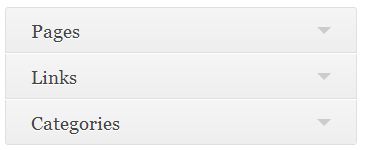
There are three type of menu available in the wordpress PagesLinks and Categories. Here we will talk about about each type of menu one by one.
type of menu A Complete Guide About Menus in WordPress
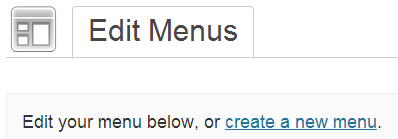
To create a new menu, go to Appearance → Menus in your dashboard. and then click  on the create a new menu link.
create menu A Complete Guide About Menus in WordPress
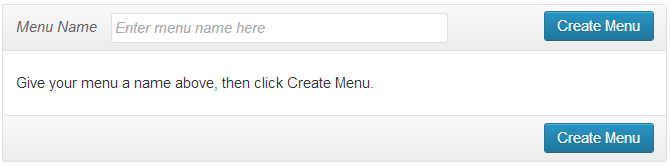
It will open a new window where you can a give desired Menu Name to your menu and then click the Create Menu button.
create menu 001 A Complete Guide About Menus in WordPress
Adding Pages to Menu
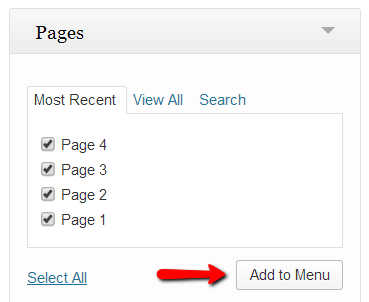
For adding pages to your menu just check the boxes in-front of the pages you want to add in menu and then click on Add to Menu button that’s it. But suppose if you have a number of pages, then you can choose to view your Most Recent pages, or Search for a page by its name in the search tab option.
page A Complete Guide About Menus in WordPress
Adding Links to Menu
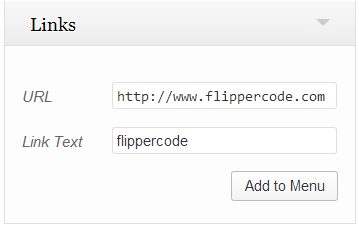
You can create a menu of different links without making a page. Type your URL and Link Text in the boxes and then click Add to Menu. Like if you want to give a link on other  website in your menu you can give URL of that website.
links A Complete Guide About Menus in WordPress
Adding Categories to Menu
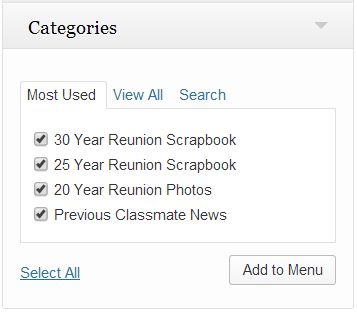
With help of categories menu you can show your desired category and posts. If you have a lot of categories, then Most Used and Search tab options can help you to choose your desired category. But only those categories will show in the list, which has at least one published post in them.
To make Categories Menu just check the box of the categories you’d like to add, and then click Add to Menu.
categories A Complete Guide About Menus in WordPress
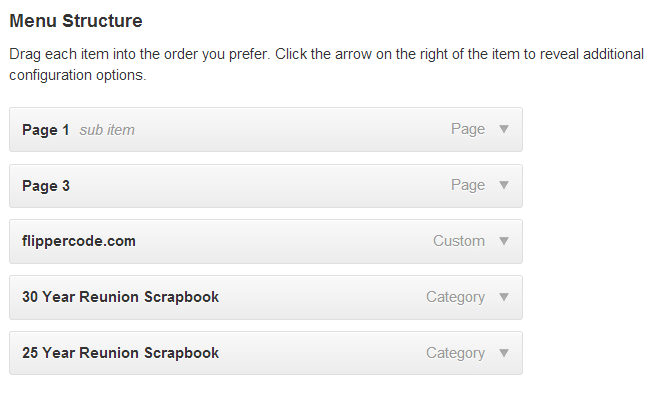
However you can create a mix item menu by selecting menu item from Pages, link and category together. Like in given below images:
mix menu A Complete Guide About Menus in WordPress
How to change the Order and Creating Sub-Menus?
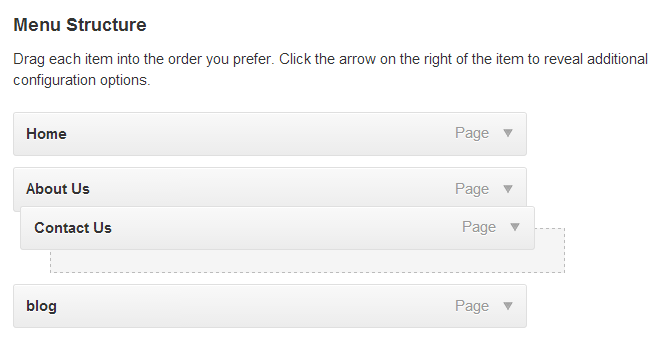
Change Order -WordPress comes with great menu flexibility, just by dragging and dropping the menu items you can change menu order.
menu11 A Complete Guide About Menus in WordPress
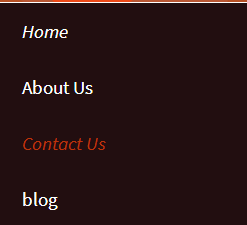
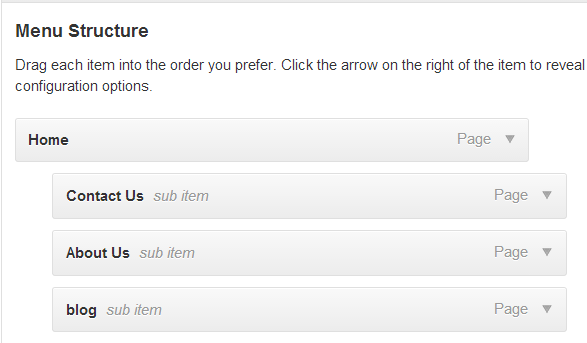
Sub Menu – Similarly to create sub-menus or “drop-down” style menus, drag menu items to the right to its parent menu item tab. You can undo this by dragging them to the left.
If you want to make a drop-down menu.like given below image.
menu drop A Complete Guide About Menus in WordPress
These are the necessary settings for making “drop-down” menu:
drop down menu A Complete Guide About Menus in WordPress

Menu Item Settings

You can also change the settings of each menu item according to your choice by clicking on the down arrow to the right of the menu item.
click A Complete Guide About Menus in WordPress
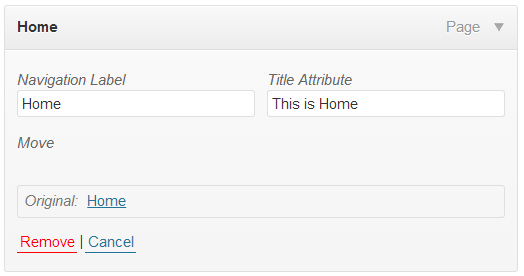
On clicking down arrow, you can see a new window where you can see the following options:
menu settings A Complete Guide About Menus in WordPress
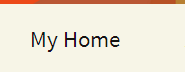
  • Navigation Label –With the help of navigation label you can change the name of menu item. Hence by using this you can override the default name of the menu item. Suppose you have a page named under ‘Home’. By default you can see same name in the menu.But suppose if you want to change the name of menu item without changing the name of pageThen with the help of navigation label you can give it a different name. In the given below image we change the name of Navigation Label from ‘Home’ to ‘My Home’, and you can see the desired change in the website menu.
new name A Complete Guide About Menus in WordPress
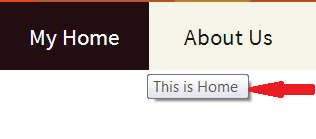
  • Title Attributes – It adds hover text to the menu item. With the help of Title Attributes you can tell about your menu item to help website visitors.
This A Complete Guide About Menus in WordPress
  • Remove –this button delete your menu item completely from menu list.
  • Cancel –You can cancel you changes you have made to it by clicking on this button.
Please don’t forget to click on Save Menu button after making any settings.However you can delete your menu any time. by clicking on Delete Menu button.
save menu A Complete Guide About Menus in WordPress
Read More
Roshan Thpa

How to Use Export/Import in WordPress

Export tool

You can export your posts, pages, comments, custom fields, categories, and tags from one wordpress website to another website by creating an XML file.
Download and save this XML file to your computer .and by using import function in other wordpress website you can import XML file.
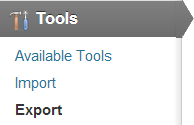
To open Export tool go to Dashboard> Tools > Export.
tools How to Use Export/Import in WordPress
Now click on Export button it will open a new window.
what to export How to Use Export/Import in WordPress
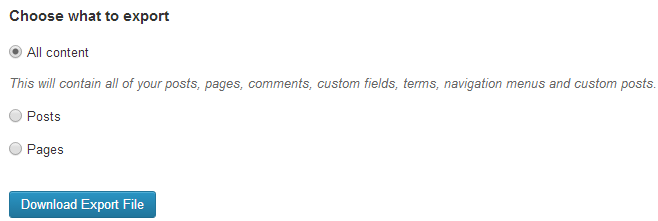
There you can see three options
All content – By using this option you can export all content of website including posts, pages, comments, custom fields etc.
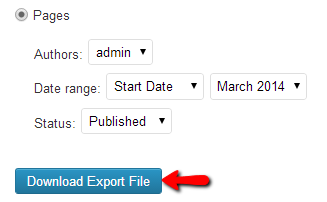
Posts or Pages– By next two options you can export Posts or Pages content. On selecting Posts or Page option, it will open a new window with different options like authors name, date range and status. Hence by using these options you can select your desired pages or posts that you want to export.
download How to Use Export/Import in WordPress
After doing all settings click on Download Export File. An XML file will automatically start downloading to your computer.

Import tool

You can import posts, page or comments or other content from another WordPress.com or WordPress.org blog or site. To open import tool go to Dashboard > Tools > Import.
By default WordPress does not provide import functionality.  Hence to get this feature you have to install a Plugin.
On clicking on import .it will open a new window where you can choose a plugin according to your need from the list of plugins.
import tool How to Use Export/Import in WordPress
In the image you can see the specification of each plugin like-
  • Blogger- is used for Import posts, comments, and users from a Blogger blog.
  • LiveJournal- is used for Import posts from a Live Journal XML export file.
  • WordPress importer- is used for Import posts, comments, custom fields, pages, and categories from a WordPress export file.
Most commonly you use WordPress importer Plugin .Here we will discuss how to use this plugin
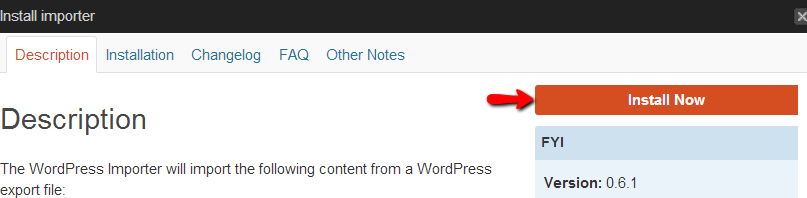
Now just click on wordpress out of all plugins. It will release a new window .where you click on install now button to install the wordpress imprter.
install importer How to Use Export/Import in WordPress
Now activate this plugins .after activation it will open a new tab from where you can choose your exported XML file (created by using export tool) from your computer.
chose file How to Use Export/Import in WordPress
Now click on upload and import XML file. It will automatically add your exported content to your website and that’s it.
Read More
Roshan Thpa

Best SEO Techniques


seoको लागि तस्बिर परिणाम

Social Bookmarking

Let’s start first to find out what you mean by social bookmarking. In simple words suppose if we find something interesting on internet like website, picture or fact then we save its URL link in our computer for future use, but suppose if we want to share this link to our family and friends then instead of saving this link to our computer you can save it to the web. Now since your bookmarks are online, you can easily share them with your friends. In other words, a social bookmark contains a link to a web page that people want to share or remember.
There are many websites on the internet like Digg, LinkedIn, Reddit, Fark where you can bookmark your content by submitting it to them. These are called bookmarking sites that are very useful for getting traffic to your content and website. Therefore these sites help you to collect such links and resources that can be shared or organized in the manner you want and under different categories to suit your needs. You can also choose to make them either open to the public or make them private for your own reference.

PDF File Submissions

You can create a search engine optimized PDF file for your business website and submit it to PDF submission websites to get better traffic for your website. Search engine give same importance to PDF files as it gives to html files. Getting a backlink here will get your keywords optimized and bring more traffic. PDF file submission sites such as slideshare, issuu, yudu etc. are frequently updated and hence search engines crawl these sites more often.
You can make use of MS Word to make a PDF file. Write an article or story related to our websites in MS Word and embed important keywords and backlinks into the article. Then convert these text files into PDF file. After conversion into PDF file we just submit into the PDF file submission websites that boost rankings.

Infographic

There is a “three second rule” the techies talk about according to this rule, a regular user of the internet just take three seconds to decide whether to stay on the page or move on. So our information should be so clear and visual so that a user doesn’t take more than 3 seconds to understand the information. So Infographic is a new SEO technique that is a visual representation of information. Instead of writing an article or blog post that takes a lot of time to read and understand and confuse readers, you can just create an Infographic that ties it all information together in a handy dandy image. Although Infographics are images and Google does not count an image but here our target are impatient web users. An infographic benefits SEO campaign because, if it’s good, it will be shared and build your link portfolio.
Page loading time really effect the Google ranking so infogrphic can help you decrease your page loading time. They are also more fun to read than a long blog post or article and tend to be visually appealing using attractive design and graphics. Since infographics display information in a pretty package so people can quickly grasp a concept, and as a result lots of inbound links back to your website as more and more people share it.

RSS FEEDS

RSS, also commonly known as Really Simple Syndication, is a feed format used to publish frequently updated content from sources such as blog entries, news headlines, and other standardized formats. An RSS feed is important for your site because you can allow your readers to subscribe to your content. In turn, they can share these feeds on social networks. The sharing process continues and your site can get more exposure. So by this you can get a huge traffic on you website.
Some search engines also allow you to submit your RSS feed and they use it to index your site. Adding RSS feeds can help a site ranking, but in a less direct way than the unique content available on your pages. Obviously if you are directing multiple feeds to your page, it is not practical or useful to take all the links and rewrite the content on your own pages.

Social Networking

Social Networking is now the most important part of changed SEO techniques. The social networking sites have a reach on the internet that is far and wide and indirectly will help in getting your business on different sites and search engines. You will also generate traffic for your website and may find many subscribers for it too. Each and every social networking site has its own unique benefits that are completely different from the other. Let’s tackle two of the most popular networking sites namely Facebook and twitter. All other networking websites such as Google+, LinkedIn, YouTube and Instagram also work on same principles.
By creating profiles pages on these most popular social networking sites using your own name or business name and linking all your accounts to one another you will be creating a larger network of your own which will present you to the search engine prolific user and the chance of finding you and your business on the network is much better. You can choose any networks that are popular among your usual customers. Be consistent in your posts and publish only relevant, interesting content.

Business Reviews

Reviews are a key factor in local SEO. Search engines show reviews in several places and often use them as a ranking factor too. Write reviews about others businesses or ask your friends/clients to write a review of your business in major business review sites like Google+, RateitAll, Shvoong, Stylefeeder, etc. Reviews left on your Google+ Local page are the most important ones, with reviews on authoritative sites, like Yelp, Yell and Scoot being secondary to those. Reviews are typically in a written format (from one sentence to several paragraphs) and are accompanied with a score or rating, which could be numerical (e.g. 1-5) or descriptive (e.g. Poor – Excellent). Only a score or rating given holds less weight than a written review.
Reviews are important for three reasons – they affect your ranking in Google’s local search results, they affect which search results get clicked on, and they affect the buying decisions of customers. This makes them as important as backlinks and citations in a local SEO strategy. Even if you do manage to rank your business at the top of the local search results for your chosen keywords with very few reviews, or even none at all, you probably won’t get much new customers if the businesses ranked below you have more reviews and/or a higher rating than your business.

Linkbait

Linkbait, also known as clickbait is a piece of content placed on a web page – whether it’s an article, blog post, picture, or any other section of cyberspace – that is designed for the specific intention of gathering links from as many different sources as possible. In simple words we can say that “linkbait” is something interesting enough to catch people’s attention, and that doesn’t have to be a bad thing. With the rise of the blogosphere, meritocracy and social bookmarking sites, all it takes is one interesting page on a site, someone to notice the page, and a few people to share the link – building up a large number of links across the internet.
Linkbait can be an extremely powerful form of marketing as it is viral in nature. This is another way to increase your link popularity. If your linkbait is quite interesting and unique then it is shared by many people on social media websites. And this start a chain reaction by which you can get millions backlink to your website without doing anything.

Exploring Multimedia

Multimedia is the most important part of 2014 Off-page SEO techniques. Develop interesting videos, images and presentations, about your products, their usage and about frequently asked questions. You can post photographs and appropriate content on picture and video sharing sites. Some of these could be YouTube, Slideshare, Pinterest, Flickr, Prezi and Instagram.

Competitor Analysis

A basic guideline to keep in mind while developing any strategies or links is diversification. Be vigilant and if you notice your competitors doing something at a forum or directory that you do not have a presence on, register immediately and create a profile. You must try to be on the maximum possible number of forums to ensure additional reach.

Search Engine Submission

Search engine submission is submitting your website URL in most popular search engines like Google, Bing, Yahoo, Ask, Aol etc. There are thousands of search engines on the internet but make a list of the major search engines for submission of your website. Directory submissions is an Off-page SEO technique. Very often people tend to get confused between Directory submissions and Search engine submissions considering both as same. But both are different. Search engines use computer programs called Robots to automatically crawling each page through the web, reading content, and adding it to their databases. As webmasters we add our website’s URL getting our site indexed. Whereas the directories used in Directory submissions are run by humans who review websites and categorize them within their directories. Yahoo and DMOZ are the two biggest directories on the web. You can also use local directories for your state, town and niche for submissions.

Questions and Answers

QA websites are also a good technique for getting good traffic. There are many QA websites on the internet. You can choose some of them which are having good Page Rank. Now first of all find any question related to our website content and then answer them and give backlink to our website. But when you are submitting a backlink in the answer of related question then it should look natural otherwise your backlink will be removed from the website. If you do not find a related question, you can add your question and submit your link in the answers. But before answering any question do some research on the internet about the question and try to submit unique and fresh content.
Follow the strategies above and get ready to find out some pleasant results for your website.  But remember, Google is now very strict on spam so focus on building quality links and contents and believe me, all these methods will work together to improve your rankings on SERPs.
Read More